Content Removal
What to Do When an Old Page Still Appears in Google
Milan Eedel Bloedt
Founder, Info Remover
Milan Eedel Bloedt has worked in search for over seven years, including in the iGaming sector where aggressive SEO tactics, fraudulent DMCA complaints and coordinated negative content are common. He founded Info Remover to handle content removal, de-indexing and search suppression cases with fixed scope and realistic expectations.
LinkedIn profile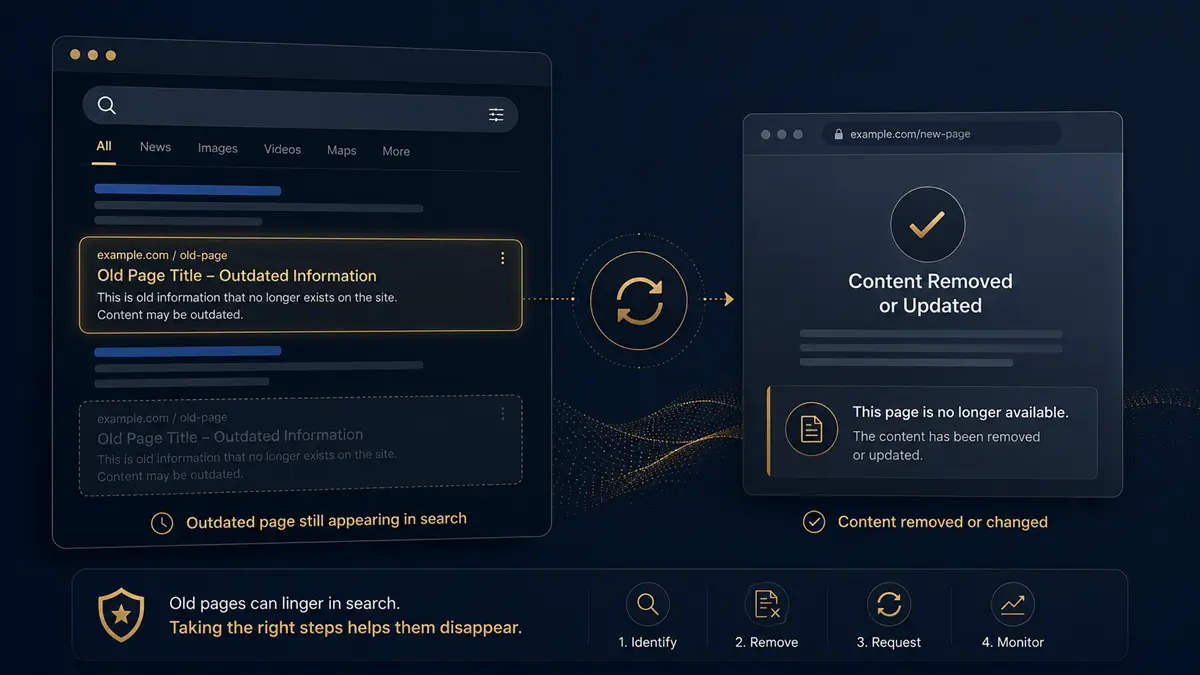
You deleted the page. You updated the content. You asked the publisher to take it down. And yet, weeks or months later, the old page is still appearing in Google Search, sometimes with an outdated title, an old snippet, or a thumbnail you thought was gone for good.
This is one of the most common questions we hear at Info Remover. The short answer is that Google does not always reflect what is currently on the open web in real time. The longer answer, which is what this guide is about, explains why old results linger, how to tell what is actually happening, and what practical steps you can take to update or remove an old Google search result.
Why old pages can still appear in Google
Google does not update every search result the moment a webpage changes. Search is built on an index, which is a snapshot of the open web that gets refreshed when Google's crawler revisits a URL. Until the next crawl, the result you see in search may still reflect the previous version of the page.
This means a page can be deleted, redirected, password-protected, edited or blocked, and Google may still show the old URL, the old title, the old description or even an old cached version for some time. It does not always mean the content is still live on the original website. It can simply mean that Google has not yet processed the change.
How quickly Google updates a result depends on factors such as how often the source site is crawled, how the change was made, whether the page returns the correct status code, whether sitemaps were updated, and whether a removal or recrawl request was submitted. There is no fixed timeline.
First, check whether the page is actually gone
Before doing anything else, confirm what is actually happening on the source URL. The Google result is a reflection of what Google last saw. The source page tells you what is there now.
There are several possibilities to check:
The page still exists and the content is still live.
The page was deleted and returns a 404 (not found) or 410 (gone) status.
The page redirects to a different URL.
The page has been updated, but Google is still showing the old title or snippet.
The page is blocked from access, but not removed from search.
The image was removed from the page but still appears in Google Images.
A simple check-the-source checklist:
Open the URL directly in a browser.
Note the current page title and headline.
Check whether the old content is still visible on the page.
Check if the URL redirects somewhere else.
Save a screenshot of the current page and of the Google result.
Copy the exact Google result URL, not the search query.
Search the old page title in Google to see all variations.
If an image is involved, check Google Images and open the source page behind the thumbnail.
This step matters because the right next action depends entirely on what the page actually looks like now.
Deleted page vs outdated snippet: what is the difference?
These terms are often used interchangeably, but they describe different problems and have different solutions.
A deleted page is a URL that no longer exists on the source website. Visiting it returns a 404 or 410 status, or the URL no longer resolves at all.
An outdated snippet means the page still exists, but Google is displaying old text, an old title, an old meta description or an old preview that no longer matches the live page.
An outdated image result means Google Images is still showing an old image or thumbnail, either because the source still hosts it, because the crawl has not refreshed, or because the same image exists on another URL.
A deindexed page is a URL that Google has removed from its search results, regardless of whether the page itself still exists on the web.
Knowing which of these applies to your situation is the difference between submitting the right removal request and wasting time on the wrong one.
When Google's outdated content removal tool may help
Google provides a public "Remove outdated content" tool that allows anyone to request a refresh of search results that no longer match the current page. This tool may help when:
The page no longer exists and returns a 404 or 410 status.
The page content has changed significantly and the old version is no longer there.
Personal information was removed from the page but still appears in Google's snippet.
An image was removed from the source but still appears in Google Images.
Google is showing an old title, description or cached version that does not match the live page.
This tool is not a takedown route and it does not remove content from the open web. It asks Google to refresh or remove what it shows in search, based on the current state of the source URL. Approval is not guaranteed and timing is at Google's discretion.
When outdated content removal may not work
The outdated content tool only works when Google can verify that the live page no longer matches the result it is showing. Common reasons a request may be rejected:
The content is still live on the source page.
The page still contains the information you want removed.
The wrong URL was submitted, for example a search result URL instead of the original page URL.
The content has not changed enough for Google to treat it as outdated.
The issue requires a different removal route, such as a personal information removal request or a legal complaint.
The result belongs to a website you control. In that case, Google Search Console is the appropriate channel.
The original publisher has not yet removed or updated the content.
If a request is rejected, that is usually a signal that the problem is upstream. The page itself, or the publisher behind it, is what needs to change first.
What to do if the old page is still live
If you visit the source URL and the old content is still there, Google is not the problem. The page is. Search engines generally reflect what is on the live web.
In this case, the practical next step is to contact the website owner, publisher, platform or webmaster. Depending on the situation, you may want to ask them to:
Remove the page entirely.
Remove your personal information from the page.
Update outdated details such as job title, role, location or contact details.
Add a noindex tag so the page no longer appears in search.
Remove an old image from the page.
Correct inaccurate or misleading information.
Remove the content from an old profile, directory listing or archive.
A polite, specific request tends to work far better than a vague or aggressive one. Most webmasters respond more constructively when the request is clear, civil and easy to act on.
What to do if you own the website
If the website is yours, you have more direct control. The most effective combination is usually a clean deletion, the correct status code and a clear signal to search engines.
Practical options include:
Delete the page properly rather than leaving an empty version in place.
Return a 404 or 410 status code where appropriate. A 410 ("gone") tells search engines the removal is intentional.
Use 301 redirects carefully. Redirecting an outdated URL to an unrelated page can keep the old result alive longer than expected.
Update the page title and meta description if you want a different snippet to appear.
Use a noindex tag when the page should remain accessible but not appear in search.
Submit updated or removed URLs through Google Search Console so Google is aware of the change.
Use the Search Console removals tool for temporary removals while permanent changes propagate.
Update your sitemap to reflect the current set of live URLs.
Avoid blocking the page with robots.txt before Google has had a chance to process the removal. Blocking a URL with robots.txt can prevent Google from seeing that the page is gone, which can ironically keep the old result visible longer.
These steps are not magic. They give Google the cleanest possible signal that the URL has changed or no longer exists.
What to do if you do not own the website
When the page lives on a site you do not control, the right approach depends on the type of site. Common examples include:
An old employee profile on a former employer's site.
An old directory or industry listing.
An old school, university or alumni page.
An old event page or conference archive.
An old press release.
An old article or blog post.
An old forum profile or comment.
An archived image on a media or stock site.
An outdated business listing.
An outdated biography on a partner or speaker page.
For most of these, the first step is publisher outreach. A clear message to the right contact, explaining what is outdated and why an update or removal is appropriate, is often enough. Where outreach is not possible or has failed, certain results may qualify for Google's personal information or outdated content removal routes.
How to document the issue before submitting a request
Documentation is one of the most undervalued parts of any removal effort. A well-documented case is easier for publishers, platforms and Google to act on, and easier for you to track over time.
Useful documentation usually includes:
The exact URL of the source page.
The exact Google search query that surfaces the result.
A screenshot of the Google result.
A screenshot of the source page as it appears now.
The date and time of your check.
A short note explaining what has changed.
A short note explaining why the Google result is outdated.
Whether personal information is involved.
Any previous contact with the publisher and the response, if any.
This record becomes the basis for outreach, for removal requests, and for any follow-up if the result resurfaces later.
How long does it take for Google to update old results?
There is no fixed timeline. Some results refresh within days of a recrawl. Others remain visible for weeks or months, especially if the source page is rarely crawled, if the change is subtle, or if conflicting signals exist across the web.
Factors that can influence timing include how often Google crawls the source site, the status code returned by the URL, whether sitemaps were updated, whether a removal or recrawl was submitted, and how Google's review processes prioritise the request. Honest expectations matter here. No one can guarantee a specific date by which a result will update.
What if Google rejects the outdated content request?
A rejection is not the end of the road. It usually means one of the conditions for the tool was not met. Practical next steps:
Recheck the source page to confirm it is truly gone or significantly changed.
Confirm the correct URL was submitted, including the exact protocol and path.
Wait a few days and check the result again, in case Google has since recrawled.
Contact the website owner or publisher directly.
Ask the publisher to update, redirect or noindex the page.
Try a different, more appropriate Google removal route if one applies.
Consider professional content removal support for more complex cases.
Consider search suppression if removal is not realistic and the priority is to reduce visibility over time.
Old images still appearing in Google Images
Images deserve their own attention. An image can remain visible in Google Images for some time after being removed from the original page, especially if the same image is hosted on another URL, embedded in archives or copied elsewhere on the web.
Practical steps for old image results:
Find the image result in Google Images.
Open the source page behind the thumbnail.
Check whether the image is still live on that page.
Use Google's reverse image search to find other copies of the same image.
If the image was removed from the source, submit an outdated content request for the image result.
For images that qualify under more specific policies, such as private images or images of minors, use the image-specific removal routes Google provides.
Monitor Google Images after submission, since images can resurface from secondary sources.
If you are specifically dealing with image issues, our Google Images cleanup page covers this work in more depth.
When search suppression is the better option
Sometimes a result cannot be removed. The page is still live and the publisher will not change it. The content is opinion-based commentary that is protected. The source is too large or too important to remove from search. In these cases, the realistic goal shifts from removal to visibility.
Search suppression works by strengthening more relevant, current and positive results so that the older or less desirable result moves further down the rankings over time. It does not delete anything. It changes what appears first when someone searches your name, brand or topic.
Suppression is slower than removal when removal is possible. It is often the better option when removal is not.
Old page still appears in Google: checklist
Use this as a working checklist when an old result will not go away.
Search your name, brand or target keyword in a private browser window.
Copy the exact Google result URL.
Open the source page directly and review its current content.
Check whether the page is still live, has been deleted, has been updated or has been redirected.
Save screenshots of both the Google result and the source page.
Identify whether the issue is a deleted page, an outdated snippet or an image.
Choose the correct removal or update route based on what you find.
Submit the request through the appropriate channel.
Track the result over the following days and weeks.
Consider publisher outreach if the source page is still live.
Consider professional support for complex or multi-URL cases.
Consider suppression if the result cannot be removed but visibility is the real concern.
Outsource outdated content removal
Old search results can be frustrating because the problem is not always obvious. Sometimes the page is gone, but Google still shows it. Sometimes the page has changed, but the old snippet remains visible. In other cases, the content is still live and needs publisher outreach before Google can update anything.
Info Remover helps individuals, professionals and businesses review outdated Google results, identify the right removal or deindexing route, prepare submissions, contact sources where included, track outcomes and provide written updates.
Our Content Removal service can help with:
Deleted pages still showing in Google.
Outdated snippets and cached results.
Old profile or directory pages.
Removed images still visible in Google Images.
Publisher or webmaster outreach.
Google and Bing deindexing submissions.
Small multi-URL outdated content cases.
Cases involving sensitive personal information may also overlap with our doxxing removal, right to be forgotten and data broker removal work.
Removal is not guaranteed. Search engines, publishers, platforms and website owners make their own decisions. Info Remover manages the process, documentation, submissions, outreach where included and monitoring.
Final thoughts
An old page appearing in Google does not always mean the content is still live. It can mean the page is gone but the index has not refreshed. It can mean the page has changed but the snippet has not. It can mean an image lingers in Google Images while the source has moved on.
The right next step depends on what is actually happening: whether the source page exists, whether the content changed, whether an image is involved, and whether Google needs to refresh, deindex or be redirected to the right signal. Work through the source first, document carefully, choose the correct route, and give Google the cleanest possible picture of what is true now.
Why does a deleted page still appear in Google?
Google may continue showing a deleted page until it recrawls the URL or processes an outdated content request. Search results are not always updated instantly.
Can Google remove an old page from search?
In some cases, yes. If the page was deleted, changed significantly or no longer contains the information shown in Google, an outdated content request may help. Approval is not guaranteed.
What if the page is still live?
If the content is still live on the source website, the website owner, publisher or platform may need to update or remove it first. Google generally reflects what is on the live page.
Why does Google still show an old snippet?
Google may show an outdated title, description or snippet until it recrawls the page and updates its index. The timing depends on how often the source is crawled.
Can old images remain in Google Images?
Yes. Images may remain visible if Google has not refreshed the result, if the source still hosts the image, or if the same image exists on another page on the web.
Is outdated content removal guaranteed?
No. Google reviews requests based on the page status and content. Some requests may be approved, rejected or require a different route. Honest removal work sets expectations accordingly.