Data Broker Removal
How to Remove Your Data From RocketReach in 2026
Milan Eedel Bloedt
Founder, Info Remover
Milan Eedel Bloedt has worked in search for over seven years. He founded Info Remover to handle content removal, de-indexing and data broker opt-outs with fixed scope and realistic expectations.
LinkedIn profile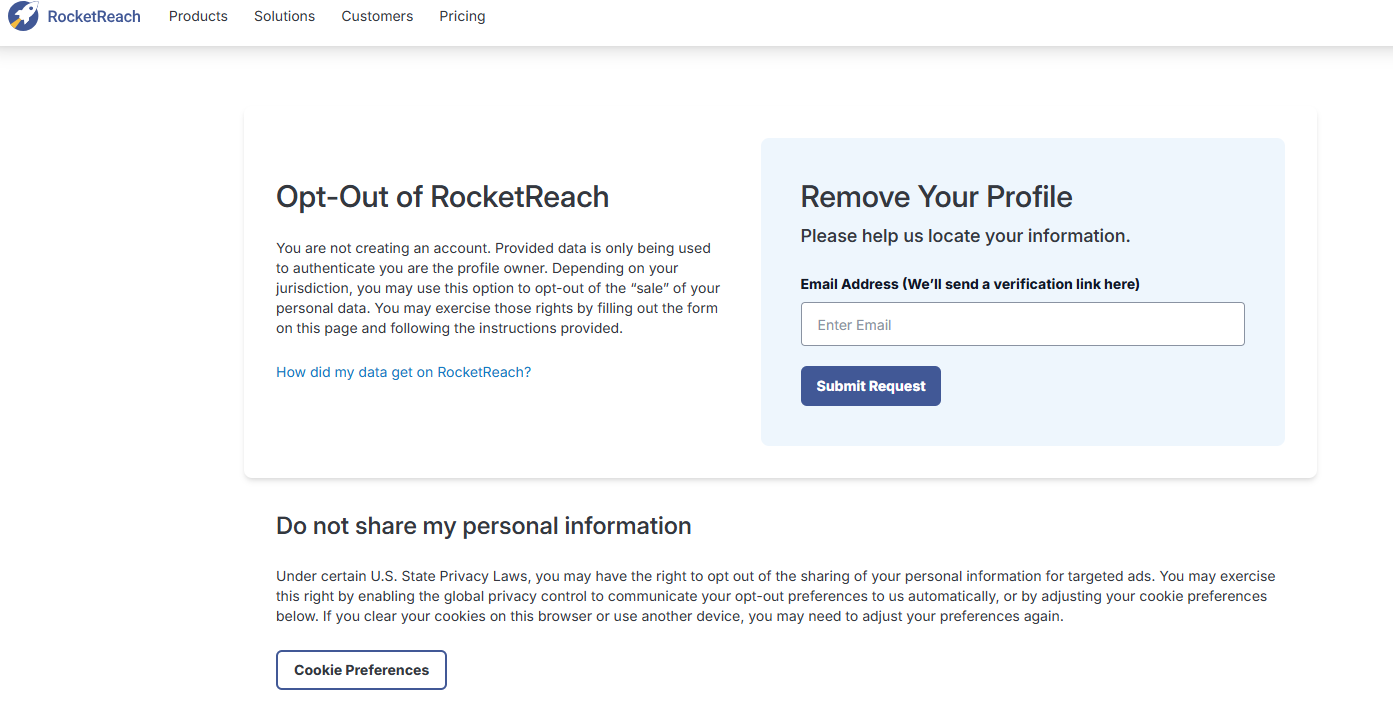
Quick answer: RocketReach provides an opt-out process. Find your profile, submit it through the removal form at rocketreach.co/remove-profile, confirm the verification email, and keep a screenshot of the confirmation. If the profile still shows in Google afterwards, ask Google to refresh the outdated result. Check again every few months, because profiles can be rebuilt from public sources.
RocketReach is a B2B contact database. It compiles names, work emails, phone numbers, job titles and employers from public sources such as company websites and professional profiles, and sells access to sales teams and recruiters.
How to remove yourself from RocketReach
- Go to rocketreach.co/remove-profile, or use the Do Not Sell My Info link in the RocketReach footer. If the form does not load, try disabling your ad blocker.
- Enter the email address for verification, your full name and your RocketReach or LinkedIn profile URL. To find your RocketReach URL, search Google for your name plus "rocketreach".
- Open the verification email and click the link. Check spam if it does not arrive. Links may expire, so act promptly.
- On the profile screen, do not fill in profile fields, since that updates the profile rather than removing it. Choose Remove My Profile.
- Give a short reason, for example: *"I do not consent to my contact data being sold or shared."*
- Screenshot the confirmation with the date visible. This is your record if the profile reappears.
If the form does not work, email privacy@rocketreach.co or support@rocketreach.co with the subject "Do Not Share or Sell My Information", your full name, employer and profile URL. Keep a copy of what you send.
What you need
- An email address you can access (a secondary address avoids linking your main inbox)
- Your full name as it appears professionally
- Your RocketReach or LinkedIn profile URL
- Your current or most recent employer
Processing times are set by RocketReach and can vary. Additional rights, such as formal deletion requests, may depend on where you live.
If the profile still appears in Google
Removing a profile from RocketReach does not instantly update Google. Google may keep showing its old copy until it recrawls the page.
Google's Refresh Outdated Content tool is meant for exactly this situation: the source page has changed or disappeared, but Google still shows the stale result or snippet. It is not a general way to de-index a page that is still live. If the RocketReach page is still online, remove it at the source first.
For persistent listings on other sites, see content removal and search suppression.
If RocketReach does not remove it
- Resend the request by email and attach your confirmation screenshot.
- Keep a dated record of every request and reply.
- If you are in California, a CCPA deletion request may apply. In the EU, a GDPR Article 17 request may apply. If a request goes unanswered, the relevant regulator may accept a complaint.
Preventing reappearance
RocketReach can rebuild a profile if your details remain public elsewhere. To reduce the risk:
- Remove your direct email and phone from public LinkedIn and company pages where you can
- Restrict LinkedIn contact info to connections
- Search your name plus "rocketreach" every few months and repeat the opt-out if needed
If you appear on several B2B databases such as Apollo, ZoomInfo or Lusha, a broader data broker removal or the Remove My Data catalog may save time.
Frequently asked questions
How do I remove my email from RocketReach? Use the RocketReach opt-out process and submit the profile that shows your email. RocketReach sends a verification link to an email address you control. If a work email keeps reappearing, remove it from public pages such as your company site or public LinkedIn contact info, then submit a new request.
Why is my RocketReach profile still in Google after removal? Google shows its last saved copy of a page until it recrawls it. Once the RocketReach page is gone or has changed, you can ask Google to refresh the stale result with its Refresh Outdated Content tool. Timing is set by Google, not RocketReach.
Do I need a RocketReach account to opt out? No. The opt-out process does not require a paid account. You can usually find your profile URL through a Google search.
Does removing my RocketReach profile affect LinkedIn? No. Opting out only concerns RocketReach. Your LinkedIn profile stays as it is.
What if RocketReach does not respond? Resend your request by email, keep copies and dates, and check whether privacy laws where you live, such as the CCPA in California or the GDPR in the EU, give you a formal deletion right and a complaint route.
Can my RocketReach profile come back? Yes, it can. RocketReach builds profiles from public sources, so if those sources still list your details, a profile may be rebuilt later. Checking periodically is the practical safeguard.
*Info Remover is not a law firm and does not provide legal advice. Removal is not guaranteed and depends on RocketReach's own processing. This guide is for information only.*